


.png)

Ready to drive incremental growth with influencers?
If ditching the randomness of influencer campaigns and building a predictable, ROI-first influencer program sounds like a plan. Consider talking to our team!


Influencer Marketing
A practical guide to collecting, tagging, and organizing influencer content so your team can find it fast, reuse it across channels, and stop chasing links and screenshots.


Contents
Influencer content doesn’t arrive neatly. It shows up in bits and pieces, spread across platforms and tools.
You might have 50 Instagram Story screenshots sitting in your phone gallery. A spreadsheet with 20–30 TikTok links pasted into random cells. A few Drive folders with vague names like “Creators Feb” or “UGC Final.”
When your ads or performance team asks, “Can we use that video in ads?”, you spend the next 20 minutes trying to find it.
This is not a you problem. It’s a system problem.
Without a clear way to collect and organize influencer content, posts get buried. Stories expire. Files sit in DMs. Links get lost.
Organizing influencer content fixes this problem.
It also helps you:
In this article, we’ll look at 4 ways to keep track of and organize influencer-generated content so your team can find it easily.
Most of this comes down to deciding how content should enter your workflow and where it should live after that.
When creators use a specific hashtag, you can pull up every related post in seconds using Instagram or TikTok search.
To make this work in practice, set some simple rules:
a) Decide on one required hashtag for all creators.
This should be non-negotiable. Something simple like #BrandNamePartner or #BrandNameAmbassador.
For example, Olipop uses #OlipopPartner.
.jpg)
And YETI does something similar with #YETIAmbassador for their ambassador program.
.jpg)
b) Add optional hashtags to organize content types.
If you sell multiple products or cater to different audiences, use secondary hashtags to sort content by category. This could be by product, audience, or use case, like #BrandNameKids, #BrandNameSwim, or #BrandNameMen.
Fashion Nova is a good example of this in action. Alongside #FashionNova, they use category-specific hashtags like #FashionNovaCurve, #FashionNovaMen, #FashionNovaJeans, and #FashionNovaDress.
.jpg)
This makes it easy to pull up content for a specific line or audience without digging through thousands of unrelated posts.
c) Separate paid and gifted collaborations.
Use different hashtags for paid partnerships and gifted seeding so you can tell them apart later. For example, paid creators can use #BrandNamePartner, while gifted creators use something like #GiftedByBrandName.
This makes it much easier to review campaign delivery versus organic seeding without guessing or digging through notes.
d) Make hashtags part of the expectation, not an afterthought.
OSEA, for example, clearly mentions its partner hashtag on its influencer landing page, so creators know what to use before they ever post.
.jpg)
Influencers often post the content but forget to send the raw files, even when it’s part of the agreement. When they do send them, it usually happens through DMs, email, or WhatsApp, which makes the files hard to track later.
Ask influencers to submit their files via a form.
That way, everything lands in one place. Each submission shows up as a new row in the same sheet, with the post link, files, and details attached. You don’t have to dig through email threads, scroll DMs, or search WhatsApp chats.
Keep the form short and practical. Add a clear yes or no question around permission to repurpose so there’s no confusion later.
Here are the fields you can copy-paste to your form:
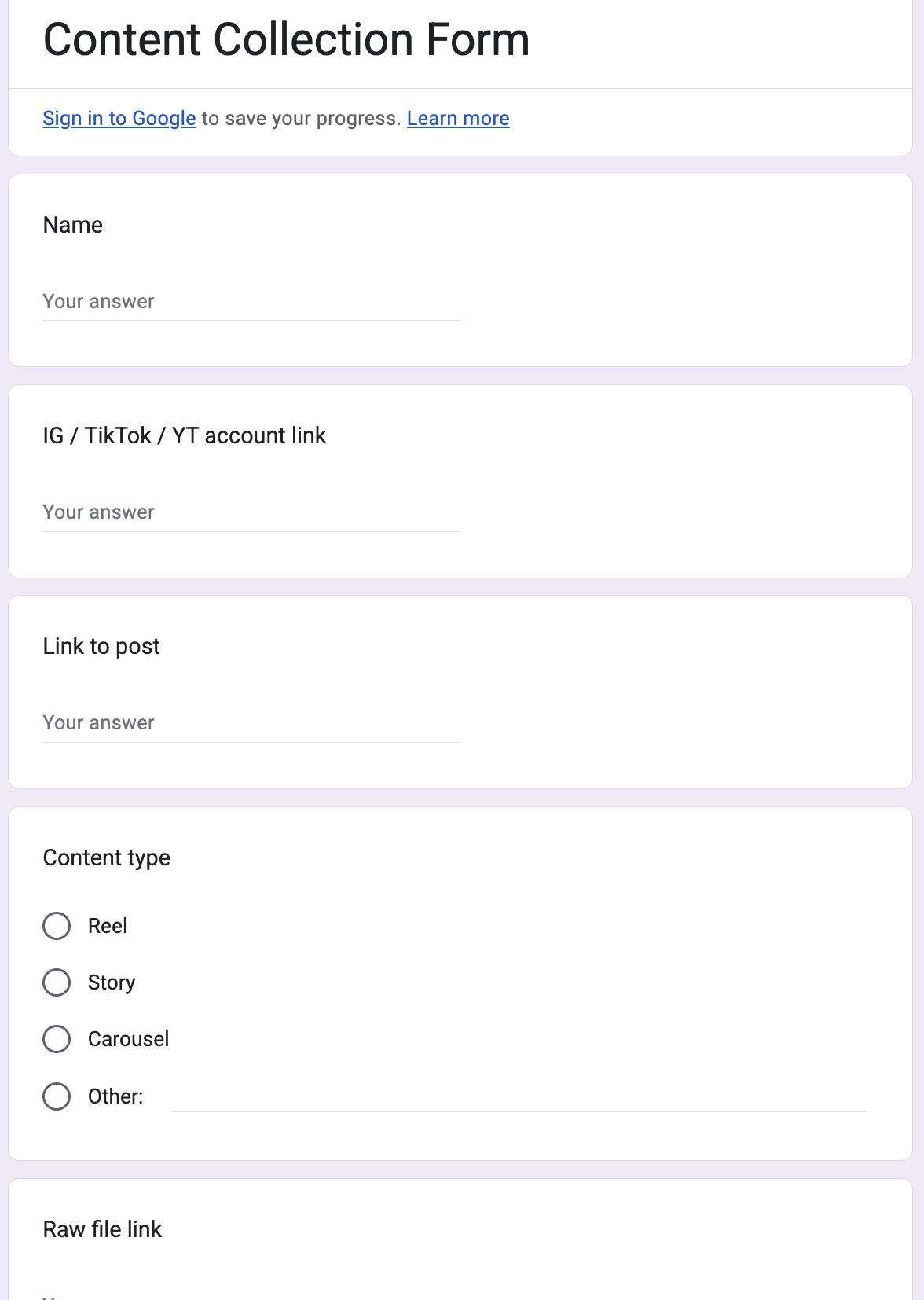
You can do this with Google Forms, Typeform, or Airtable. The tool matters less than the habit.
Influencer content should not live in personal folders, private notes, or one person’s Notion workspace. It needs to live in a shared system where access can be managed at a team or company level.
At the same time, it doesn’t need to be open to everyone by default. A better approach is to give access by use case. Each team should only see the content they are allowed to use. This keeps things safe and avoids confusion.
For example,
Everyone works from the same system, but not everyone sees every file.
This setup reduces risk and removes guesswork. Teams can move quickly without accidentally using content they shouldn’t, and the influencer manager doesn’t have to police usage after the fact.
Everything above works well when your influencer program is small. As it grows, manual tracking gets harder. More creators. More platforms. More posts to keep up with.
This is where SARAL helps.
SARAL lets you log influencer posts and stories directly inside each creator’s profile. If a creator posts on Instagram, TikTok, or YouTube, you can add the post link, story link, or even upload screenshots if the story has already expired. You also log the posted date, so everything stays tied to the actual timeline.
.jpg)
Once a post is logged, SARAL automatically pulls basic performance data like likes, comments, and views. The creator is also marked as “Active,” which makes it easy to filter and see who is currently posting for your brand without cross-checking spreadsheets or DMs.
If you want to see how it fits your workflow, book a consultative demo here.
By now, you have a system for collecting content. Creators submit through a form, raw files land in one place, and your team stores everything in a clean folder structure. That solves the “Where is the content?” problem.
Tracking usage rights solves the next problem: “Can we use this content, and where?”
Creators should not be the ones deciding between terms like “paid usage,” “whitelisting,” or “UGC rights.” Many won’t know what those mean, and even if they do, they might answer inconsistently. So instead of relying just on creators to choose the right label, your team also labels the content internally.
Add a column or tag on each asset that makes the status obvious:
Your field type should be able to support multiple tags because the same content type can be eligible for different uses.
This system protects you from accidentally using content in a way you don’t have permission for. It also speeds up your workflow. When someone from ads or email is searching for content, they can filter for assets that are approved and move forward without coming back to you with questions.
Once you have a way to collect content, control access, and track usage rights, folder structure becomes much simpler. The goal is not to mirror how content came in. The goal is to make content easy to find months later by anyone who needs to reuse it.
Organizing by month or influencer campaign usually works at the beginning, and it often feels natural. The issue is what happens later. When someone needs content again, they are not thinking “Was this from March or April?” or “Was this part of the Spring launch?” They are thinking about the product or the use case.
Products are stable. Campaigns and months are not.
If you sell multiple products, people across the company will almost always search for content by product first. They ask questions like “Do we have UGC for coffee concentrate?” or “Do we have creator content for drip coffee?” They rarely ask which month or campaign the content came from.
For long-term clarity, your top-level folder structure should follow how your business thinks about its products.
If you are a coffee brand, that means folders like:
Products are stable. Campaigns and months are not. Organizing this way ensures content stays useful long after the original post goes live.
Inside each product folder, organize by content type, not by usage rights. This reflects how teams actually search for content. Ads, email, and social teams usually start with questions like “Do we have a how-to?” or “Do we have lifestyle content?”
A simple structure inside each product might look like:
.jpg)
It’s true that ad teams often start with a question like, “Do we have whitelisting-approved content?” That doesn’t mean whitelisting should be the main way you organize your folders.
Whitelisting is a permission, not a content type.
The same piece of content might be organic-only at first, then later approved for whitelisting after a pricing discussion or follow-up with the creator. If your folder structure is built around whitelisting, you either end up duplicating files or constantly moving them when permissions change.
If you need to account for time or campaigns, track those as metadata (in Notion, it's easy with different fields), not folders. Dates and campaign names are useful for reporting and analysis, but they should not determine where content lives.
This structure works because it answers three questions quickly:
When your folders reflect those questions, influencer content stays searchable, reusable, and easy to manage as your library grows.
You don’t need to overhaul everything at once. The fastest way to see progress is to fix one part of the system that’s breaking today. Pick the scenario that sounds most familiar and start there.
→ If creators are posting but you’re losing track:
Set a required branded hashtag and add it to your creator guidelines today. This gives you a simple way to surface posts without manual searching.
→ If you have content but can’t find the raw files later:
Create a simple submission form and ask creators to upload raw files once they post. This stops files from getting scattered across DMs, email, and WhatsApp.
→ If your team keeps asking what content they can use:
Move influencer content out of personal folders and into shared, access-controlled folders. Make sure usage rights are visible on each asset.
→ If ads or email keep asking for the same things repeatedly:
Standardize how you label content by product and content type so teams can self-serve instead of coming back to you every time.
Once you’ve fixed the biggest friction point, the rest becomes easier. You’ll start to see patterns around what still slows you down, whether that’s tracking posts, managing permissions, or understanding which creators actually deliver.
This is where tools like SARAL can help.
Beyond organizing content, SARAL connects creator relationships, post tracking, and performance in one place. It gives your team one place to manage all the tedious tasks of influencer marketing.
If you’d like to see how this could work for your brand and your current workflow, you can book a consultative demo and talk through it with the SARAL team.
Sign up for a 7-day email course on the unique "Predictable Influence" strategy used by top brands like Grüns, Obvi, Tabs Chocolate.

If ditching the randomness of influencer campaigns and building a predictable, ROI-first influencer program sounds like a plan. Consider talking to our team!
